Introducing Clip Lens — Smart Actions

Your clipboard
just got a brain.AI clipboard manager for Windows

ClipLens saves everything you copy, categorizes it instantly, and shows smart contextual actions. Copy a color? See the palette. Copy JSON? Validate it instantly. Copy math? See the answer.

Get it on Microsoft Store Free forever. No account needed.
100% Free tier
Tray app Always ready
Private Data stays local
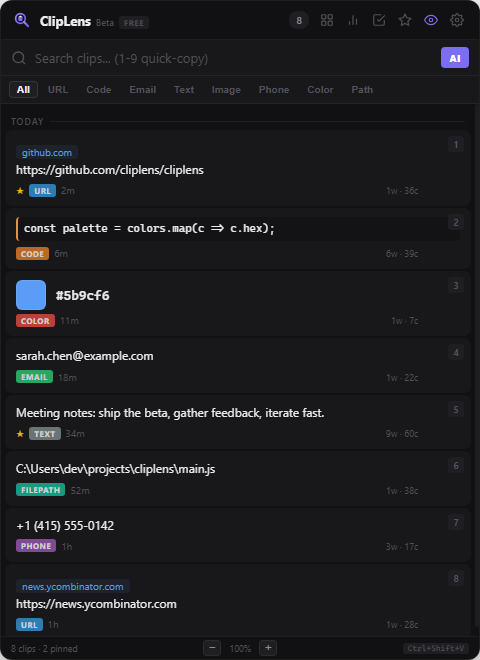
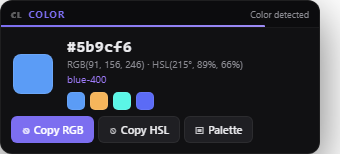
ClipLens app showing clipboard history with auto-categorized URL, code, color and email clips Clip Lens popup detecting a color and showing RGB, HSL and a palette

Everything you copy,
organized and smart.

📋

Unlimited History

Every Ctrl+C is saved. Search, scroll, and recall anything you copied — minutes or days ago.

🏷️

Auto-Categorize

URLs, code, emails, colors, phone numbers, file paths — automatically detected with colored badges.

🤖

AI Search FREE

"That API key from earlier" — ask in natural language and AI finds the right clip. Free & private, powered by your own local Ollama.

Quick Paste

Press 1-9 to instantly copy the Nth item. Arrow keys + Enter for keyboard navigation.

🔄

Transform Tools

Right-click for UPPERCASE, lowercase, Title Case, trim, reverse. Copy the transformed version.

📊

Stats & Export

See your clipboard analytics. Export your history as JSON or CSV. Multi-select and merge clips.

The feature no one else has

Clip Lens
Smart Actions

When you copy something, a floating panel appears near your cursor with contextual one-click actions. Your clipboard becomes a command.

Copy a URL Domain preview, Open in Browser, QR Code
Copy code Language detected, AI Explain, Prettify
Copy an error AI Explain, Search StackOverflow, Google
Copy 256*48 = 12,288 calculated instantly
Copy a color Swatch + palette + RGB/HSL values
Copy JSON Validate, Prettify, Copy Keys
Copy foreign text Language detected, AI Translate

AI that's free & private

ClipLens runs its AI features on your own computer — no subscription, nothing leaving your machine. A zero-setup cloud option is on the roadmap.

🦙 Local AI with Ollama Free · Available now AI search, explain, translate & rewrite — running 100% offline on your own Ollama. Free forever, fully private.
Cloud — zero setup Coming later Don't want to install anything? A hosted option with nothing to configure is on the roadmap.

Simple pricing

Free
$0/forever
  • Unlimited clipboard history
  • Auto-categorization
  • Clip Lens (basic actions)
  • Search & filter
  • Pin, delete, quick-paste
  • QR codes & transform tools
Download Free
Coming soon
Pro
$3.99/month
  • Everything in Free
  • AI included — no setup needed
  • AI natural language search
  • AI Explain Code & Errors
  • AI Translate
  • AI Improve Writing
  • Export JSON/CSV
  • Multi-select & merge
  • Priority support
Coming soon

Pro & AI features are in development. The app is free to download and use today.

Just launched · Beta

Be among the first

ClipLens is brand new — so no inflated star ratings, no fake testimonials. Just an honest tool we built and use every day. Try it, and help shape what comes next.

🚀

Early adopter

Get in before everyone else and lock in the launch experience.

💬

Your feedback shapes it

Tell us what to build next — early feedback gets prioritized.

🔒

Nothing to hide

Your clipboard data stays on your machine. Always.

Share your feedback

Ready to upgrade your clipboard?

Install ClipLens from the Microsoft Store and start copying smarter.

Get it on Microsoft Store Windows 10/11 • One-click install • Auto-updates • No account required
Prefer a portable version? Download the standalone .exe — no installer, runs from anywhere.
Installing from the Store? No warnings — it just installs. The portable .exe above may show "Windows protected your PC" because it's unsigned; click More infoRun anyway. Either way, ClipLens runs locally and your clipboard data never leaves your machine.